








- Local Time
- 7:24 PM
- Joined
- Nov 10, 2022
- Messages
- 6,721
- Age
- 27
Hello to those new to the forums! Not sure how everything works? I will post a bit of a guide to help out~
First and foremost is the text editor, the full version on a web browser will look like this:

Going from left to right you will find:
Any further questions that you may have you can post it here in this thread and anyone will be happy to answer! I'm sure I covered the basics but this is all new to us staff users as well so we're learning with you
Notes/Edits:
Want a fancy name color to your username like me? Here's a small walkthrough.
Edited: 8/14/23
Some helpful links!
First and foremost is the text editor, the full version on a web browser will look like this:
Going from left to right you will find:
- Spoiler (eye with slash)
- Insert image (ctrl + p)
- Insert link (ctrl + k)
- Font size
- Font family (i.e. trebuchet vs. Georgia)
- Text color such as this
- Italicize (ctrl + i )
- Bold (ctrl + b)
- Underline (ctrl + u)
Strikethrough(ctrl + s)-
Quote (**The editor will automatically put text into this box if you hit the 'reply' option at someone else's post!)
- Alignment (center, left, right, full)
- List (like this one being made. You can have bullets or numbers (ordered and unordered))
- Media (similar to insert image but can also add videos and whatnot)
- Insert table (*if BB code is toggled off you will not see it. Best to have the editor on to do so)
- Insert horizontal line like this:
Smilies, such as and 
- Remove formatting. (It will only remove the next text formatting. i.e. You used colored text previously but do not want more colored text, so you will choose the eraser option. Want to remove all formatting, I suggest highlighting said text and then using the eraser icon)
- Drafts. (your post will auto save and will be available for your use for the next 24 hours, so don't worry about losing any work if you accidentally close a tab!)
- Undo (ctrl + z)
- Redo (ctrl + shift + z)
- Toggle bb code ( </> ). If it is red it is inactive and the buttons are available for your use. If it is green then it is active and all the buttons will be greyed out, so you will have to manually change the format yourself.
Any further questions that you may have you can post it here in this thread and anyone will be happy to answer! I'm sure I covered the basics but this is all new to us staff users as well so we're learning with you
Notes/Edits:
- On mobile and smaller windows, the editor will condense and you will see three stacked dots in it's place. Don't worry, everything that is mentioned above is the same still, just hidden out of view.
- The preview button with the magnifying glass let's you see your post in all it's glory before you send it out to the forum. You won't be able to edit anything in the editor until it is not unselected.
- You are able to resize images! If you find that your image takes up half of the page, click on it (while bb code is toggled off) and you'll see four corners pop up on the image, and from there you are able to move and adjust it to your liking. Honestly I had no idea this existed, it would have saved so much grief when I first started here XD
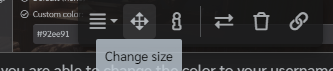 My recommended size for pictures would just be 250 px X Autosize like this: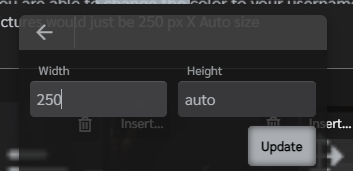
Want a fancy name color to your username like me? Here's a small walkthrough.
- Go to your name that is listed in the header of the website, on the right side of the search bar. Click on it and go to your account details.
- Once there scroll down and you will see this:

- From there you are able to change the color to your username! Now, originally I was going to have certain colors be 'locked' for those who chose them first, but that seriously bugged out the website, so feel free to use any color that comes to mind. Since this UI to the website is a fairly dark one, make sure to pick a color that will be fairly readable!
Edited: 8/14/23
Some helpful links!
- Text Colorizer Gives your font a gradient color. All you have to do is input the BB Code the color options give at the bottom of the page and you will have text like this!
Last edited: